AgataSoft HotKey Manager1.4
Publisher Description
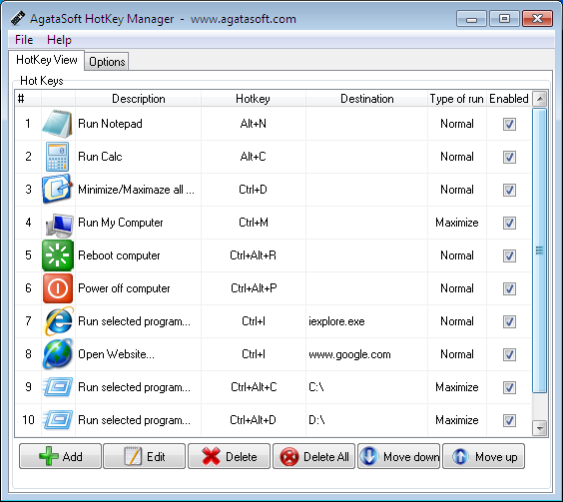
Tired of opening frequently launched programs using desktop shortcuts or by drilling into the depths of the Programs menu?
Assign hotkeys to the programs you use most often!
It's easy - just use AgataSoft HotKey Manager.
AgataSoft HotKey Manager is a hotkey manager for Windows.
With this program, you can easily assign keyboard shortcuts to your frequently run programs. You can also do the following with AgataSoft HotKey Manager:
Assign a hotkey to the "Open My Computer" action.
Assign a hotkey to the "Open My Documents" action.
Assign a hotkey to the "Launch Calculator" action.
Assign a hotkey to the "Launch Notepad" action.
Assign a hotkey to the "Open a command prompt" action.
Assign a hotkey to the "Power off computer" action.
Assign a hotkey to the "Restart computer" action.
Assign a hotkey to the "Hibernate" action.
Assign a hotkey to start the selected program.
And other actions.
Some key features of AgataSoft HotKey Manager:
Easily assign keyboard shortcuts to your programs.
Assign keyboard hotkeys to your frequently visited websites.
Use a hotkey to open a specific drive.
Assign a hotkey to open/close your CD-ROM
Close the selected program using a hotkey.
About AgataSoft HotKey Manager
This Launchers & Task Managers program is available in English. It was last updated on 13 October, 2026. AgataSoft HotKey Manager is compatible with the following operating systems: Windows.
The company that develops AgataSoft HotKey Manager is AgataSoft. The latest version released by its developer is 1.4. This version was rated by 1 users of our site and has an average rating of 3.0.
The download we have available for AgataSoft HotKey Manager has a file size of N/A. Just click the green Download button above to start the downloading process. The program is listed on our website since 2010-03-09 and was downloaded 443 times. We have already checked if the download link is safe, however for your own protection we recommend that you scan the downloaded software with your antivirus. Your antivirus may detect the AgataSoft HotKey Manager as malware if the download link is broken.
How to install AgataSoft HotKey Manager on your Windows device:
- Click on the Download button on our website. This will start the download from the website of the developer.
- Once the AgataSoft HotKey Manager is downloaded click on it to start the setup process (assuming you are on a desktop computer).
- When the installation is finished you should be able to see and run the program.
